

 AdonisJS
The idea
A prompt is simply what you type to ask FetchskiAI for something. A good prompt answers three questions:- What should change, or be written?
- Who is it for, and what should they do next?
- How should it sound, how long, and what should it leave out?
The FetchskiAI Agent
Open the Agent on a page, and the panel asks What should change on this page? It offers a few ideas to start from. Choose one to put it in the message box, then edit it before you send:- Add a short section introducing what we do, after the first section
- Make the closing call to action more direct
- What could make this page clearer?
- Build this page from the content on my current website (shown first, when the Agent can visit web pages; it leaves the cursor where your website’s address goes)
- Rewrite this section so it sounds more like us
- Make the heading shorter and punchier
- Turn this into a different kind of section that fits it better
- Rewrite this section from my current website (shown first, when the Agent can visit web pages)
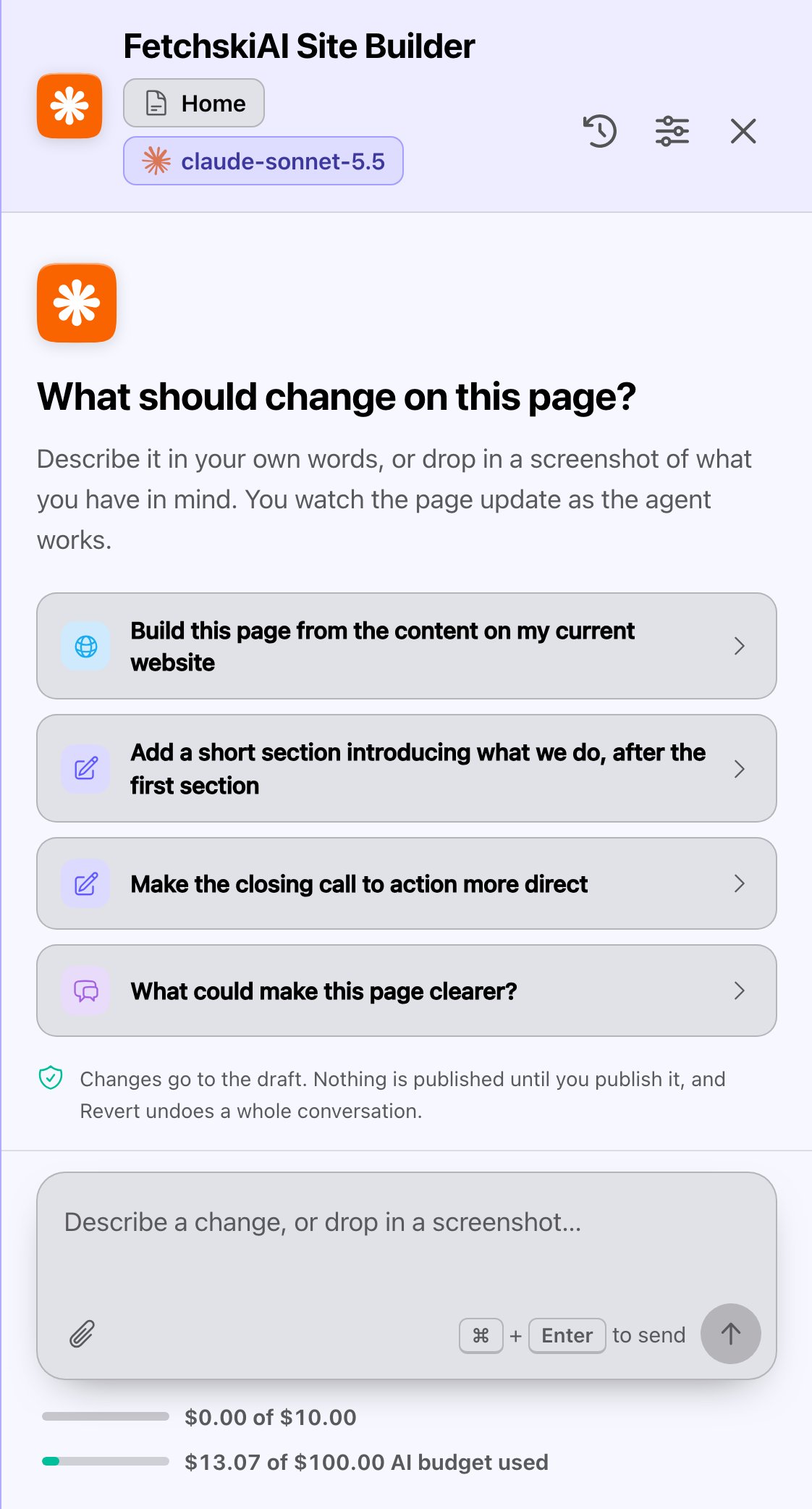
The Agent's starter ideas. Choose one, then make it yours.
- Name the section and the spot. “After the feature cards” beats “somewhere on the page”.
- Show it. Drop in a screenshot of a layout you like, and say what to borrow from it.
- Ask first, change second. A question like “What could make this page clearer?” gets ideas without changing anything.
- One job at a time. Several small requests are easier to review than one big one.
Writing help in rich text
In any rich text, select some words and choose AI assist. Then choose Improve, Expand, Summarize or Rewrite…. For Rewrite…, the box asks How should it be rewritten? Try (Rewrite…): “Friendlier and shorter, for busy dog owners. Keep the opening hours exactly as written.” To write new text where the cursor is, choose Write with AI. The box asks What should be written? Or choose Continue writing to carry on from the text so far. Try (Write with AI): “A 3-sentence paragraph about our indoor play area: rubber floors, separate zones for small and large dogs, and staff on the floor at all times.” Tips for writing help:- Say what to keep. Prices, times and names are easy to lose in a rewrite.
- Give a length. “2 sentences” or “under 50 words” works better than “short”.
- See Writing help for every option.
Images
In the image window, the prompt box is called Describe the image. Say four things in plain words: what’s in the picture, how close or wide the view is, the light, and the feeling. The hint under the box says the same in camera words: “Be specific about subject, framing, lighting and mood.” Its example shows the level of detail: “A wide, sunlit workshop interior, warm neutral tones, shot on 35mm”. You don’t need the camera words. Try: “Three happy puppies playing tug of war on a bright indoor play floor. Low angle at the dogs’ eye level, soft daylight from big windows. Cheerful and candid, with empty space on the left for text.” To change a picture, choose Edit this on a result, or Choose from library to start from one of your images. Then describe only the change. Try (edit): “Make it late afternoon, with warmer light. Keep the dogs exactly as they are.” Tips for images:- What’s in it, the view, the light, the feeling. Cover all four, in that order.
- Plan for text. If a headline will sit on the picture, ask for empty space where it goes.
- See Image generation for every option.
Blog posts
In Blog Posts, choose Generate with AI, and the box asks What should the post cover? The gray text inside it is your checklist: “Topic, angle, audience, key points, tone…”. The more of those you give, the better the draft. Try: “5 signs your dog is ready for daycare. For first-time dog owners in Portland who work long days. Cover energy at home, playing with other dogs, separation stress, vaccines and trial days. Warm and practical, not salesy, ending with an invitation to book a trial day.” Choose Text only for a written post, or Rich content to add sections such as stats or steps. Turn on Create images for this post only if you want new pictures, since each one costs money. See Generate a blog post for the whole flow.A short example
Jordan wants a page for Parker’s new puppy training classes.- First try: “Make a training page.” The Agent builds a page, but it’s generic and says nothing about puppies or Portland.
- Better: “Build out this page for our puppy training classes: 6-week course, Saturday mornings, small groups of 6 puppies aged 10 to 20 weeks. Explain what puppies learn each week. End with a button to Book a spot. Friendly and encouraging.”
- The Agent builds a page with the right details. Jordan follows up with “Make the weekly plan a How it works section” (a section that lays out numbered steps), then reviews the draft and publishes.
Good to know
- Everything starts as a draft. The Agent, writing help and blog posts only change drafts. You choose what goes live.
- Check the facts. AI can be confident and wrong. Read prices, times, addresses and phone numbers before you publish.
- Each request uses your AI budget. Clear prompts usually get it right sooner, which costs less. See Usage and budget.
Related
The FetchskiAI Agent
build and change pages by asking.
Writing help
AI assist and Write with AI in rich text.
Image generation
describe a picture and get options.
Custom instructions
tell FetchskiAI how you like to write.